
Performance
Olyx is designed to keep gateway work small compared with model latency, but closed beta performance numbers should be treated as measurement guidance, not contractual guarantees. Your observed latency depends on region placement, database connectivity, provider latency, tool execution, and whether a request uses an outbound private agent route.
The practical goal is simple: measure the full path your users experience, then use traces to separate model time, tool time, and Olyx-recorded workflow time.
Measurement Model
Think about latency in segments. Olyx can make the request observable, but it cannot remove provider latency, client network distance, or time your application spends inside tools.

Use the table below to decide where to look before optimizing. The first question is not “is Olyx slow?” It is “which segment owns the extra time?”
| Segment | What it includes |
|---|---|
| Client transit | Browser, server, or worker network time before the request reaches Olyx |
| Gateway work | Authentication, trace lookup, routing, core safety checks, and trace-step recording |
| Provider time | The selected model provider’s queueing, generation, and response time |
| Tool time | MCP server calls, internal API calls, database reads, or agent tool execution between turns |
| Trace completion | Summary calculation, grade calculation, and async analysis after the core work is recorded |
Olyx does not currently expose a standalone gateway_overhead_ms field in every trace summary. During closed beta,
measure gateway overhead with controlled comparisons: same region, same model, same prompt shape, and one variable
changed at a time.
Gateway Work Per Request
Every governed execution does a small amount of work before the selected model path runs. These steps are expected to be stable in a warm reference environment, but they are still affected by database and cache health.
| Step | Closed-beta expectation |
|---|---|
| API key authentication | Fast lookup when keys and project state are warm |
| Trace lookup | Project-scoped trace resolution before execution starts |
| Core checks | In-process request checks before provider dispatch |
| Routing decision | Model selection from configured routing tiers and project state |
| Trace-step recording | Core step written on the request path; heavier summaries run after completion |
Cost calculation, optimization grades, and workflow summaries run when the trace is completed. That keeps the primary execution path focused on the work needed to run the request and preserve the audit trail.
Reading Trace Latency
For application code, measure the SDK path you actually ship. Create a trace, execute inside it, complete it, then read
the summary fields. Completion is important because summary fields such as total_latency_ms, chain_depth, and
tool_overhead_ms are most useful once the workflow is closed.
import Olyx from "@olyx-labs/olyx";

const client = new Olyx({ apiKey: process.env.OLYX_API_KEY! });

const trace = await client.traces.create({
  metadata: { feature: "perf_probe", userId: "u_123" },
});

try {
  await client.execute({
    traceId: trace.data.id,
    input: "Return a concise status summary.",
  });
} finally {
  await client.traces.complete(trace.data.id);
}

const details = await client.traces.find(trace.data.id);
const summary = details.data.summary;

console.log({
  totalLatencyMs: summary?.totalLatencyMs,
  chainDepth: summary?.chainDepth,
  toolOverheadMs: summary?.toolOverheadMs,
});
import os
import olyx
client = olyx.Olyx(
api_key=os.environ["OLYX_API_KEY"],
mock=False,
)
trace = client.traces.create(
metadata={"feature": "perf_probe", "user_id": "u_123"}
)
try:
client.execute(
trace_id=trace.id,
input="Return a concise status summary.",
)
finally:
client.traces.complete(trace.id)
details = client.traces.find(trace.id)
summary = details.summary or {}
print({
"total_latency_ms": summary.get("total_latency_ms"),
"chain_depth": summary.get("chain_depth"),
"tool_overhead_ms": summary.get("tool_overhead_ms"),
})client = Olyx.new
trace = client.traces.create(
metadata: { feature: "perf_probe", user_id: "u_123" }
)
begin
client.execute(
trace_id: trace.id,
input: "Return a concise status summary."
)
ensure
client.traces.complete(trace.id)
end
details = client.traces.find(trace.id)
summary = details.summary || {}
puts({
total_latency_ms: summary["total_latency_ms"],
chain_depth: summary["chain_depth"],
tool_overhead_ms: summary["tool_overhead_ms"]
})Use total_latency_ms for the full recorded trace path. Use individual trace steps when you need to see which model run
or tool call added the delay.
MCP Workloads
MCP and tool-call workflows are multi-turn. They can be fast, but they have a different shape from a single prompt and response because each tool request adds application work and usually another model continuation.
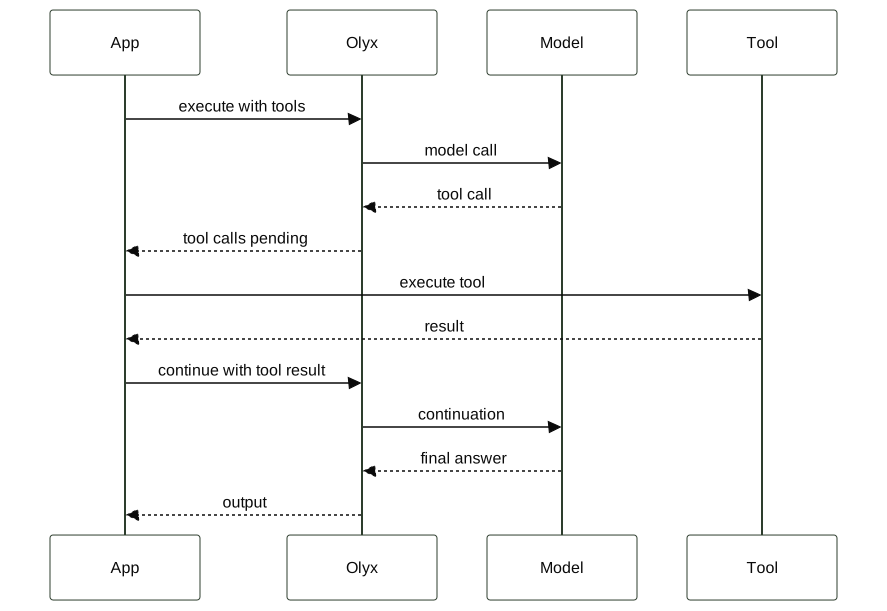
For multi-turn tool chains, inspect chain_depth and tool_overhead_ms on completed traces.
| Signal | How to read it |
|---|---|
High chain_depth + high tool_overhead_ms | Tool execution is likely the bottleneck |
High chain_depth + low tool_overhead_ms | Many fast tool calls; consider batching if the model loops |
High stall_probability | Review termination conditions and repeated tool arguments |
A stall_probability above 0.5 is a review signal, not a production incident by itself. Check the tool_call and
tool_result steps for repeated calls with identical arguments.
Streaming
Olyx streams model output through the gateway path instead of waiting for the full response body. During closed beta, treat first-token latency as:
client transit + gateway work + provider first-token latency + response transitIf the user experience depends on perceived responsiveness, measure first-token time separately from full completion time. A page can feel fast when tokens start quickly even if the full answer takes longer.
Private Agent Routes
Private routes use an outbound-only Olyx Agent for selected beta deployments. This path is useful when a workload needs to reach private models or internal tools, but it adds a different latency shape from a direct public-provider call.

For private routes, measure the public and private paths separately. The agent path includes agent connection health, queue depth, local network time, and private model startup behavior.
| Segment | What affects it |
|---|---|
| Olyx to agent dispatch | Agent connection health, queue depth, and region distance |
| Agent to private model/tool | Local network path, private service load, and cold starts |
| Agent result return | Response size and outbound network path |
For sensitive workloads, correctness and network posture may matter more than matching public-provider latency. The closed-beta expectation is visibility, not a hard latency promise.
Load Testing
Load test the same path your application will use in production. During closed beta, use a dedicated test project and dedicated API keys. Do not run synthetic load against production keys or customer traffic until beta limits are confirmed.
Create one test key per worker in the dashboard or through the API reference. Then pass those keys to the load runner.
The example below uses the Python SDK so the test exercises the same execute and trace-completion path as application
code.
import concurrent.futures
import os
import statistics
import time
import olyx

API_KEYS = [
    key.strip()
    for key in os.environ["OLYX_LOAD_TEST_KEYS"].split(",")
    if key.strip()
]

BASE_URL = os.environ.get("OLYX_GATEWAY_URL", "https://app.olyxai.io")


def run_once(index: int):
    key = API_KEYS[index % len(API_KEYS)]
    client = olyx.Olyx(api_key=key, base_url=BASE_URL, mock=False)

    trace = client.traces.create(
        metadata={"source": "sdk_load_test", "worker": index}
    )

    started = time.perf_counter()
    try:
        client.execute(trace_id=trace.id, input="Return the word ok.")
    finally:
        client.traces.complete(trace.id)

    details = client.traces.find(trace.id)
    summary = details.summary or {}

    return {
        "wall_ms": round((time.perf_counter() - started) * 1000, 2),
        "total_latency_ms": summary.get("total_latency_ms"),
        "chain_depth": summary.get("chain_depth"),
        "tool_overhead_ms": summary.get("tool_overhead_ms"),
    }


with concurrent.futures.ThreadPoolExecutor(max_workers=10) as pool:
    results = list(pool.map(run_once, range(50)))

wall_times = [row["wall_ms"] for row in results]
print({
    "runs": len(results),
    "avg_wall_ms": round(statistics.mean(wall_times), 2),
    "p95_wall_ms": sorted(wall_times)[int(len(wall_times) * 0.95) - 1],
})
This script is intentionally small. It is good for a closed-beta smoke load test, not a substitute for a full production capacity plan.
What to Watch
After a load test, inspect completed traces rather than relying on a single aggregate number. A healthy run has stable latency, no unexpected gateway errors, and no circuit-breaker trips from accidental single-key bursts.
| Metric | Investigate when |
|---|---|
| Total trace latency | p95 grows after no application, provider, or region change |
| Tool overhead | Tool-heavy traces dominate end-to-end latency |
| Chain depth | Agents repeatedly call tools when a single call should be enough |
| Unexpected 5xxs | Errors are coming from the gateway path rather than a provider or private tool |
| Loop detection | Synthetic load is concentrated on one key or the workflow is looping |
If you intentionally run bursts from a single key, use a test project and reset the project settings afterward. For normal load tests, one key per worker gives cleaner results and avoids confusing the loop detector.