
MCP
Olyx keeps MCP tool calls tied to the same SDK request and trace as the model work. Use this page when you are wiring an MCP server into an application and want the flow to stay visible.
The guide path is SDK-first: use the Olyx SDK or an OpenAI-compatible SDK configured for the Olyx gateway. Raw HTTP snippets live in the API reference because MCP execution requires client-side tool orchestration.
For language-specific service-object examples, see TypeScript SDK MCP tools, Ruby SDK MCP tools, and Python SDK MCP tools.
Quickstart
- Run or deploy an MCP server for one narrow tool scope, such as documents, billing, search, or analytics.
- Store its URL in an environment variable such as
BILLING_MCP_URL. - Create a trace for the request.
- Pass the MCP server as a tool through the SDK.
- Execute any returned tool calls in your application.
- Continue the same trace with
tool_results.
The first call gives the model access to the declared MCP tool. If the model asks to use it, your application runs the
tool and sends the result back through execute.
import Olyx from "@olyx-labs/olyx";

const client = new Olyx({ apiKey: process.env.OLYX_API_KEY! });

const trace = await client.traces.create({
  metadata: { userId: "u_123", intent: "billing_assistant" },
});

const result = await client.execute({
  traceId: trace.data.id,
  input: "Summarize invoice inv_123 and flag payment risks.",
  tools: [{
    type: "mcp",
    serverLabel: "billing",
    serverUrl: process.env.BILLING_MCP_URL!,
    requireApproval: "never",
  }],
});
import os
import olyx
client = olyx.Olyx()
trace = client.traces.create(
metadata={"user_id": "u_123", "intent": "billing_assistant"}
)
result = client.execute(
trace_id=trace.id,
input="Summarize invoice inv_123 and flag payment risks.",
tools=[{
"type": "mcp",
"server_label": "billing",
"server_url": os.environ["BILLING_MCP_URL"],
"require_approval": "never",
}],
)client = Olyx.new
trace = client.traces.create(
metadata: { user_id: "u_123", intent: "billing_assistant" }
)
result = client.execute(
trace_id: trace.id,
input: "Summarize invoice inv_123 and flag payment risks.",
tools: [{
type: "mcp",
server_label: "billing",
server_url: ENV.fetch("BILLING_MCP_URL"),
require_approval: "never"
}]
)Core Concepts
Olyx does not replace your MCP server. It sits between your application and the model provider, keeps the tool request tied to one trace, and records the model’s tool-call decisions.

The important boundary is tool execution. Olyx records what the model requested and how the trace continued, but your application decides how the MCP server is called and what output is safe to return.
Use MCP when the model needs controlled access to systems outside the prompt.
| Use case | Typical MCP server |
|---|---|
| Document retrieval | Internal docs, files, CMS, knowledge bases |
| Search and enrichment | Search indexes, web search adapters, CRM lookup |
| Analytics | Data warehouse, BI metrics, event stores |
| Operations | Tickets, incidents, deployment metadata |
| Internal operations | Deployment metadata, incidents, billing systems |
Keep each MCP server scoped to one responsibility. A document service, search service, and analytics service should usually expose separate tool scopes instead of one broad server with mixed permissions.
Execution Loop
MCP workflows are multi-step. The model can request a tool, your application runs it, and the follow-up execute call
keeps the work visible as one trace.
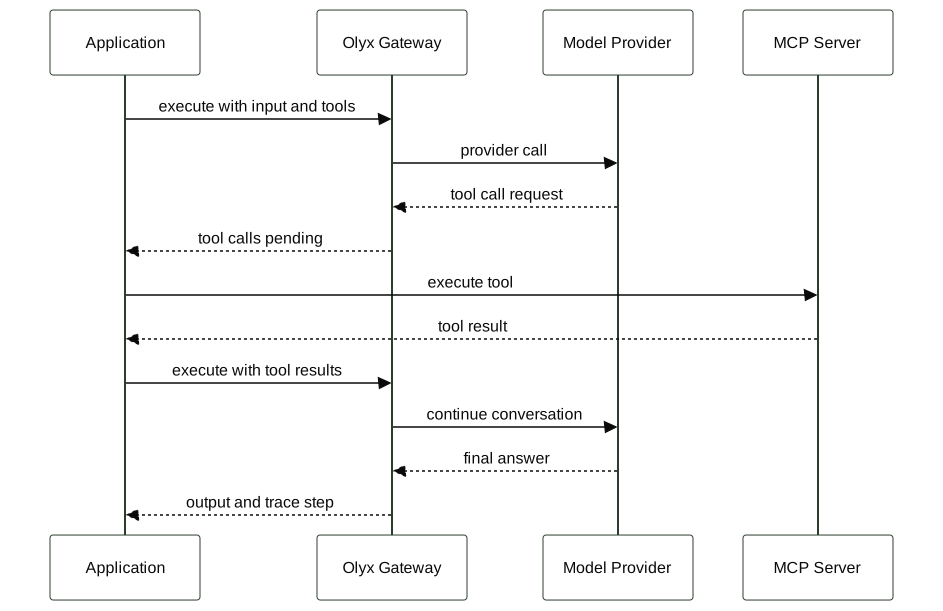
This loop is the heart of MCP in Olyx. A pending tool call is not a failure; it is the model asking your application for
permissioned data. The follow-up execute call attaches the tool result to the original step using parent_step_id or
parentStepId.
let result = await client.execute({
  traceId: trace.data.id,
  input: "Summarize invoice inv_123.",
  tools: billingMcpTools(),
});

while (result.toolCallsPending) {
  const toolResults = await Promise.all(
    result.toolCalls.map(async (call) => ({
      toolCallId: call.id,
      name: call.name,
      content: await executeMcpTool(call.name, call.input),
    }))
  );

  result = await client.execute({
    traceId: trace.data.id,
    parentStepId: result.data.stepId,
    toolResults,
  });
}
import json
result = client.execute(
trace_id=trace.id,
input="Summarize invoice inv_123.",
tools=billing_mcp_tools(),
)
while result.tool_calls_pending:
tool_results = []
for call in result.tool_calls:
output = execute_mcp_tool(call.name, call.arguments)
tool_results.append({
"tool_call_id": call.id,
"name": call.name,
"content": json.dumps(output),
})
result = client.execute(
trace_id=trace.id,
parent_step_id=result.step_id,
tool_results=tool_results,
)result = client.execute(
trace_id: trace.id,
input: "Summarize invoice inv_123.",
tools: billing_mcp_tools
)
while result.tool_calls_pending?
tool_results = result.tool_calls.map do |call|
output = execute_mcp_tool(call.name, call.arguments)
{ tool_call_id: call.id, name: call.name, content: output.to_json }
end
result = client.execute(
trace_id: trace.id,
parent_step_id: result.step_id,
tool_results: tool_results
)
endKey idea: Olyx governs the loop; your app executes tools.
When to Use MCP vs Inline Tools
Use inline tools for small deterministic functions that live inside the same process. Use MCP when the model needs to reach a shared service or tool surface owned by another team.
| Use this | When |
|---|---|
| Inline tools | Simple logic, low latency, no external system |
| MCP server | External systems, shared services, or cross-team tooling |
| Internal MCP | Shared internal systems that should stay behind a service boundary |
Rule of thumb: if the tool calls another service, use MCP. If the tool is pure local logic, keep it inline.
Tool Format Compatibility
Olyx accepts tool definitions from SDK calls and normalizes them before provider execution. MCP-style schemas and OpenAI-style function schemas describe the same idea: a named operation with JSON Schema input.
| Field | OpenAI-style function | MCP-style tool |
|---|---|---|
| Tool name | function.name | name |
| Description | function.description | description |
| Input schema | function.parameters | inputSchema |
| Execution owner | Your application | Your application or MCP server |
OpenAI-style function
Use this shape when your app sends OpenAI-compatible function tools. The schema lives in
function.parameters.
{
  "type": "function",
  "function": {
    "name": "lookup_invoice",
    "description": "Find an invoice by ID.",
    "parameters": {
      "type": "object",
      "properties": {
        "invoice_id": { "type": "string" }
      },
      "required": ["invoice_id"]
    }
  }
}
MCP-style tool
Use this shape when your app exposes MCP tools directly. The schema lives in
inputSchema.
{
  "name": "lookup_invoice",
  "description": "Find an invoice by ID.",
  "inputSchema": {
    "type": "object",
    "properties": {
      "invoice_id": { "type": "string" }
    },
    "required": ["invoice_id"]
  }
}
What stays the same:
- JSON Schema describes the input.
- The model sees a named capability with a description.
- Your application validates and executes the resulting tool call.
- Olyx records the decision and continuation steps in the trace.
SDK Pattern
Initialize one Olyx client per service and keep MCP server configuration local to that service. This keeps permissions easy to review and prevents unrelated workflows from seeing tools they do not need.
import Olyx from "@olyx-labs/olyx";

class BillingAssistant {
  private client = new Olyx({ apiKey: process.env.OLYX_API_KEY! });

  async answer(question: string, userId: string) {
    const trace = await this.client.traces.create({
      metadata: { userId, intent: "billing_assistant" },
    });

    return this.client.execute({
      traceId: trace.data.id,
      input: question,
      tools: this.mcpTools(),
    });
  }

  private mcpTools() {
    return [{
      type: "mcp" as const,
      serverLabel: "billing",
      serverUrl: process.env.BILLING_MCP_URL!,
      requireApproval: "never" as const,
    }];
  }
}
import os
import olyx
class BillingAssistant:
def __init__(self):
self.client = olyx.Olyx()
def answer(self, question: str, user_id: str):
trace = self.client.traces.create(
metadata={"user_id": user_id, "intent": "billing_assistant"}
)
return self.client.execute(
trace_id=trace.id,
input=question,
tools=self._mcp_tools(),
)
def _mcp_tools(self):
return [{
"type": "mcp",
"server_label": "billing",
"server_url": os.environ["BILLING_MCP_URL"],
"require_approval": "never",
}]class BillingAssistant
def initialize
@client = Olyx.new
end
def answer(question:, user_id:)
trace = @client.traces.create(
metadata: { user_id: user_id, intent: "billing_assistant" }
)
@client.execute(
trace_id: trace.id,
input: question,
tools: mcp_tools
)
end
private
def mcp_tools
[{
type: "mcp",
server_label: "billing",
server_url: ENV.fetch("BILLING_MCP_URL"),
require_approval: "never"
}]
end
endFor internal tools, keep the server URL in environment configuration and expose only the narrow tool scope required by the service object.
OpenAI-Compatible SDK Pattern
If your app already uses an OpenAI-compatible client, point that SDK at the Olyx gateway and keep sending tool schemas through the client. This path is useful during migration because the application code still owns tool execution, while Olyx keeps the request in the same observable path.
Use this pattern for existing OpenAI-compatible applications. Use the Olyx SDK pattern when you want first-class trace helpers and typed resource clients.
import OpenAI from "openai";

const openai = new OpenAI({
  apiKey: process.env.OLYX_API_KEY!,
  baseURL: "https://app.olyxai.io/v1",
});

const response = await openai.chat.completions.create({
  model: "frontier-model",
  messages: [
    { role: "user", content: "Summarize invoice inv_123 and flag payment risks." },
  ],
  tools: [{
    type: "function",
    function: {
      name: "lookup_invoice",
      description: "Find an invoice by ID.",
      parameters: {
        type: "object",
        properties: { invoice_id: { type: "string" } },
        required: ["invoice_id"],
      },
    },
  }],
});
import os
from openai import OpenAI
openai = OpenAI(
api_key=os.environ["OLYX_API_KEY"],
base_url="https://app.olyxai.io/v1",
)
response = openai.chat.completions.create(
model="frontier-model",
messages=[
{
"role": "user",
"content": "Summarize invoice inv_123 and flag payment risks.",
}
],
tools=[{
"type": "function",
"function": {
"name": "lookup_invoice",
"description": "Find an invoice by ID.",
"parameters": {
"type": "object",
"properties": {"invoice_id": {"type": "string"}},
"required": ["invoice_id"],
},
},
}],
)require "openai"
openai = OpenAI::Client.new(
access_token: ENV.fetch("OLYX_API_KEY"),
uri_base: "https://app.olyxai.io/v1"
)
response = openai.chat(
parameters: {
model: "frontier-model",
messages: [
{
role: "user",
content: "Summarize invoice inv_123 and flag payment risks."
}
],
tools: [{
type: "function",
function: {
name: "lookup_invoice",
description: "Find an invoice by ID.",
parameters: {
type: "object",
properties: { invoice_id: { type: "string" } },
required: ["invoice_id"]
}
}
}]
}
)When the response contains tool calls, dispatch those calls to your MCP client or local adapter, then continue the conversation through the same SDK. Avoid building raw request payloads in application code unless you are working inside the API reference or a low-level SDK implementation.
Routing Context
Keep routing context on the SDK call instead of branching through provider-specific code in the application. That gives the trace enough metadata to explain why a request took a given path.
await client.execute({
  traceId: trace.data.id,
  input: "Summarize this document.",
  metadata: { routing_strategy: "cost_optimized" },
});
At runtime, project routing can choose an appropriate registered model without changing the MCP service object.
Do not hardcode provider-specific logic in your application:
if (provider === "provider_a") { /* duplicated path */ }
if (provider === "provider_b") { /* duplicated path */ }
Keep that logic in project routing settings so traces and costs remain comparable.
Failure Modes
MCP workflows should stop cleanly when the tool loop cannot continue. If a tool cannot be executed or the continuation call is missing required context, the model should not proceed as if the tool succeeded.
| Scenario | Behavior |
|---|---|
| Schema mismatch | Request is blocked or rejected before provider execution |
| Invalid arguments | Tool execution should be rejected by your application |
| MCP timeout | Step stops and should be visible in the trace |
| Missing tool result | Execution cannot continue from the pending tool-call step |
If a tool cannot be safely executed, return an explicit tool error or stop the workflow. Silent fallbacks make traces hard to reason about and can hide unsafe model behavior.
Performance Considerations
MCP introduces additional work because the model may need more than one round trip. Use traces to tell whether latency is coming from model reasoning, tool execution, or the continuation call.
| Component | Impact |
|---|---|
| Tool decision | Adds model latency for deciding whether to call a tool |
| MCP execution | Adds external service latency controlled by your infrastructure |
| Continuation | Adds another governed model round trip after tool results are returned |
Monitor these trace summary fields when tuning MCP-heavy workflows:
summary.tool_overhead_mssummary.chain_depthsummary.total_cost
Optimize by keeping tool responses small, avoiding deep tool chains, and routing simple tasks away from tools.
MCP Server Requirements
An MCP server should expose a narrow, validated interface. Treat it like an internal API that may be called with model-generated arguments.
| Requirement | Why it matters |
|---|---|
| Expose tool definitions | The model needs names, descriptions, and schemas to choose the right tool |
| Accept structured input | Your application can validate arguments before touching internal systems |
| Return compact JSON output | Smaller results reduce latency and make traces easier to inspect |
Example tool result
{
  "invoice_id": "inv_123",
  "status": "overdue",
  "amount_due": 1200
}
Return only the fields the model needs for the next step. Keep raw records and large documents out of tool results unless the workflow explicitly requires them.
Operating Guidelines
Treat MCP tools like internal APIs exposed to a stochastic caller.
- Scope each server narrowly.
- Validate tool arguments before execution.
- Use project-scoped API keys per environment.
- Return compact tool results so later model turns stay easy to review.
- Keep broad administrative tools out of the first MCP scope.
Observability
Every MCP workflow is visible in traces. Inspect each step to separate model behavior from tool behavior.
| Step | What to inspect |
|---|---|
tool_call | Requested tool name, arguments, model, latency |
tool_result | Returned content and parent tool-call relationship |
run | Final model response after tool results |
For long-running agentic workflows, check summary.chain_depth, summary.tool_overhead_ms, and
summary.stall_probability on the trace. High tool overhead usually means the bottleneck is the tool or MCP server, not
the Olyx gateway.
See Traces, Performance, and Cost Intelligence for the operational views that help debug MCP workloads.
Common Pitfalls
Most MCP issues come from broad scopes, loose schemas, or hidden tool latency. Start narrow and make every tool result easy to inspect in a trace.
| Issue | Cause |
|---|---|
| Tool never called | Description does not clearly tell the model when to use the tool |
| Over-calling tools | Prompt or tool description nudges the model to call tools unnecessarily |
| High latency | Tool chain has too many external hops or slow downstream systems |
| Unexpected arguments | Schema is too loose or missing required fields |
Improve schemas and tool descriptions to stabilize behavior.