
Authentication
Olyx uses two authentication paths with different jobs:
- API keys authenticate backend services that create traces and run model executions.
- Dashboard sessions authenticate people who manage projects, keys, billing settings, and team access.
Most application integrations only need API keys. Session endpoints exist for the dashboard and selected control-plane automation, but day-to-day model traffic should go through SDK clients configured with an Olyx API key.
Which Auth Should I Use?
Start with the identity that matches the actor. A service should use an API key; a person should use a session.

| Scenario | Use |
|---|---|
Backend service calling execute | API key |
| Worker creating traces or replays | API key |
| CI job running integration checks | API key with test-project scope |
| Human using the dashboard | Session |
| Internal admin script managing projects | Session or a dedicated administrative flow, depending on the task |
If the code sends prompts or creates traces, use an API key. If the code manages account configuration for a human user, use a session.
API Keys
API keys are bearer tokens for backend systems. A key identifies the customer and, when project-scoped, the project whose model registry, budget settings, trace history, and routing settings apply to the request.
Generate keys in the dashboard and store the full value in a secrets manager. The secret portion is shown once at creation.
Key Format
ak_<key_id>.<secret>Keys are two-part tokens joined by a dot.
| Part | Purpose |
|---|---|
key_id | Identifies the key in logs and trace attribution. Safe to display in administrative UIs. |
secret | Authenticates the request. Treat it like a password and never expose it client-side. |
If a key is compromised, revoke that key and rotate the affected service. Keeping one key per service or environment makes that response much smaller.
SDK Configuration
Every SDK reads the API key from configuration and attaches it to requests for you. Prefer environment variables or a secrets manager over hard-coded values.
import Olyx from "@olyx-labs/olyx";

const client = new Olyx({
  apiKey: process.env.OLYX_API_KEY!,
});
import os
import olyx
client = olyx.Olyx(
api_key=os.environ["OLYX_API_KEY"],
mock=False,
)client = Olyx.new(
api_key: ENV.fetch("OLYX_API_KEY")
)For local development, use a test project key. For production, use project-scoped keys per service and rotate them on a schedule.
What Keys Enforce
A key is more than a password. It ties requests to a project context, which gives Olyx enough information to apply project settings and attribute usage.
| Capability | What it means |
|---|---|
| Project scope | A project key can only act within the project it belongs to. |
| Trace attribution | Executions can be traced back to the key that created them. |
| Spend caps | Optional limits can stop runaway usage for a service or environment. |
| Key status | Revoked or paused keys are rejected before model execution. |
Use API Keys for key creation, rotation, spend limits, and project-scoping details.
Dashboard Sessions
Sessions authenticate people using the dashboard. They are established by logging in with email and password. During closed beta, MFA is an email one-time code flow when it is enabled for the account.
Use sessions for dashboard activity: managing projects, inviting team members, changing account settings, or reviewing billing setup. Do not put session cookies into backend workers or model-calling services.
MFA and Email Verification
MFA protects dashboard sessions. When enabled, Olyx sends a short-lived email code during login. The code completes the login challenge and establishes the session.
Email verification is separate. New accounts must verify their email before they can use most dashboard features. If a verification link expires, request a new link from the dashboard.
| Control | Purpose |
|---|---|
| Email verification | Confirms the user owns the email address used for signup. |
| MFA email code | Adds a second step before a dashboard session is established. |
| Session revocation | Signs out other active browser sessions after sensitive account changes. |
This guide focuses on the application integration path. For backend services, API keys are the right credential in every case.
Enable MFA in the Dashboard
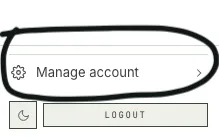
- Open Manage account from the sidebar.
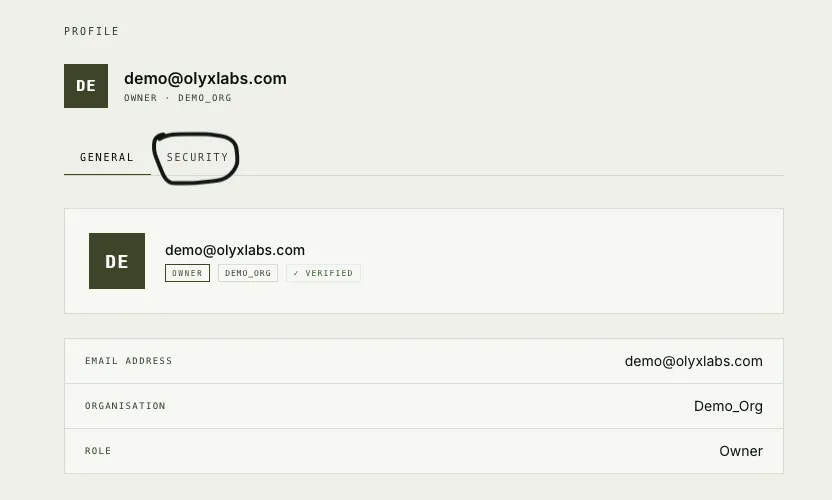
- In your profile, open Security.
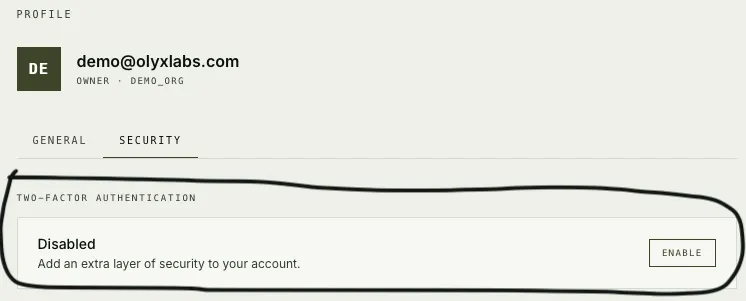
- Under Two-factor authentication, choose Enable and complete the email-code challenge.
Failure Behavior
Authentication failures stop before model execution. This is important: an unauthenticated request should not be routed to a provider, recorded as a successful trace, or silently retried with a different identity.
| Failure | Expected outcome |
|---|---|
| Missing API key | SDK/API request is rejected. |
| Malformed key | Request is rejected before project lookup. |
| Revoked key | Request is rejected and should be fixed by rotating configuration. |
| Archived project | Request is rejected for that project context. |
| Expired session | Dashboard request returns to login. |
For SDK applications, treat auth errors as configuration problems. Rotate or replace the key; do not fall back to a provider key outside the governed path unless you have explicitly designed a non-sensitive fail-open path.
Security Practices
Use these defaults during closed beta:
| Practice | Why it matters |
|---|---|
| Store keys in a secrets manager | Prevents source-code leaks and accidental browser exposure. |
| Use one key per service | Limits blast radius and makes trace attribution clearer. |
| Use separate keys per environment | Keeps staging load and failures away from production usage. |
| Set spend caps on production keys | Reduces damage from loops, spikes, or misconfigured jobs. |
| Rotate keys on a schedule | Makes stale credentials less useful if they leak. |
| Enable MFA for owner/admin users | Protects project, billing, and team management workflows. |
Never ship Olyx API keys to browser code or mobile clients. Put AI calls behind your backend, then let the backend call Olyx with a project-scoped key.